
ADAS DEPOT | CALIBRATION GUIDES
Hyundai, Kia & Genesis Front Radar Calibration: Tools, Targets, and OEM Software Access
What your shop needs to calibrate driver-assist systems after a collision repair.
Three purchases decide whether your shop can calibrate Hyundai, Kia, and Genesis driver-assist systems after a collision repair: the model-correct front radar target and stand, a J2534-compliant VCI interface with an active OEM software subscription, and a scan tool or calibration platform whose Hyundai/Kia/Genesis driver-assist coverage matches the model years in your bay.
The OEM procedure supplies the distances, heights, and aiming geometry. Your job is to own the hardware and the software path that let you execute it repeatably. This checklist walks through the equipment list in the order a shop actually buys it.
Why Hyundai/Kia/Genesis Front Radar Calibration Requires OEM-Specific Procedures
Hyundai, Kia, and Genesis calibration is an OEM-guided job. The procedure, target type, and aiming geometry are set per platform and model year. The shop's role is to supply the correct targets, the correct scan tool coverage, and access to the manufacturer's software path.
Generic calibration routines are not a substitute for the OEM procedure on these vehicles.
Three things drive the equipment decision:
Hyundai, Kia, and Genesis front radar and forward camera work calls for the OEM-correct target face and stand for the vehicle in the bay, not a universal target substituted across the group.
OEM software access runs through the manufacturer's subscription service and requires a J2534-compliant VCI interface. The scan tool or calibration platform used to run the guided procedure is a separate piece of the kit.
Bumper cover, radar bracket, windshield, camera bracket, suspension, and steering work can all be part of the same estimate as the calibration line item. That's why shops handling HKG vehicles often standardize on a package rather than buying one target at a time.
ADAS Depot's catalog is built around this split: targets and stands, scan tools, VCI/J2534 interfaces, alignment equipment, and complete packages. Our team can also provide OEM software and hardware guidance when you're working through the setup.
Required Calibration Targets and Static/Dynamic Setup Specs by Model
The distance, height, and offset figures for each Hyundai, Kia, and Genesis platform come from the OEM procedure for that model and model year. They are not published as a single cross-brand table. Substituting another platform's numbers is one of the common causes of a failed calibration.
What a shop can standardize on is the equipment class each vehicle group requires:
| Setup Element | What It Requires | Best For |
|---|---|---|
| Level, unobstructed calibration bay | Flat floor with enough length for the front target, controlled lighting, and clear sightlines. | Shops performing static front radar and camera calibration. |
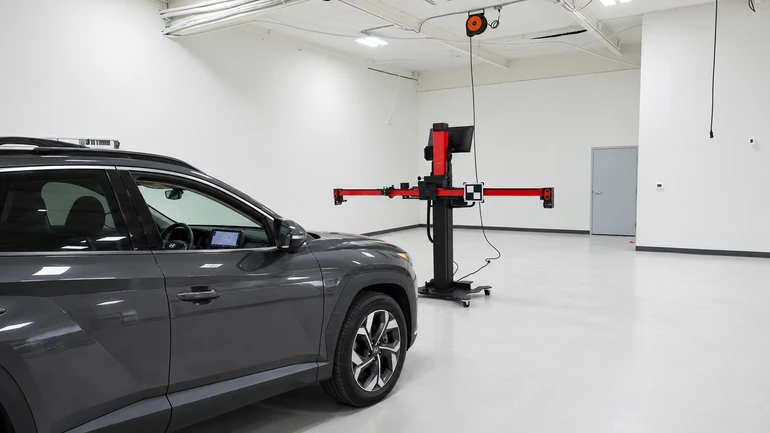
| OEM front radar target and stand | Model-correct target face and adjustable stand for repeatable height and distance. | Hyundai, Kia, and Genesis front radar calibration. |
| Wheel alignment capability | Alignment and ride-height verification before calibration. | Estimates involving suspension or steering repair. |
| Windshield-camera target set | Camera targets for vehicles requiring forward camera calibration. | Windshield replacement or camera bracket work. |
| Complete calibration package | Targets, stands, and scan tool equipment sourced together. | Shops setting up an HKG-capable bay for the first time. |
Static vs. dynamic calibration matters
Some HKG front radar procedures are completed with the vehicle stationary against a target. Others include a dynamic road phase, and some vehicles require both a radar and a forward camera routine in the same session.
The target face itself is not interchangeable across the group. A target that satisfies one platform's procedure may not satisfy another's. Shops servicing a mixed HKG fleet may need more than one target rather than a single universal face.
Building Out Your Calibration Bay?
A complete package can be a practical starting point if you're setting up for this work. Shops that already own targets and only need the diagnostic side can explore diagnostic scan tools.
Explore Complete ADAS PackagesScan Tools and VCI/J2534 Interfaces Needed for OEM Software Access
OEM software access on Hyundai, Kia, and Genesis runs through the manufacturer's subscription service. You reach it with a J2534-compliant vehicle communication interface paired with a laptop and the OEM application.
The scan tool or calibration platform used for ADAS work is a separate component. Its Hyundai, Kia, and Genesis driver-assist coverage is the specification that matters.
The VCI/J2534 Interface
This is the physical pass-through between your laptop and the vehicle's networks. It is what the OEM software communicates through during a calibration or reprogramming session. Choose an interface validated for the OEM applications you subscribe to. An interface that only works with one aftermarket platform will not necessarily open the OEM calibration path.
The Scan Tool or Calibration Platform
This is what guides the technician through the procedure and confirms the module accepted the result. Verify Hyundai, Kia, and Genesis driver-assist coverage against the specific model years you service before purchasing.
Most collision shops end up with both: a J2534 interface for OEM software sessions, and a scan tool or calibration platform for guided ADAS procedures.
ADAS Depot's ADAS Calibration Tools collection is organized around this equipment split. Our team can help match the interface and subscription path to the platforms you service.
How ADAS Depot's Approach Differs from Software-Report Platforms
ADAS Find and SUN Collision are names that often surface in this category. They are largely software and procedure-report platforms, where shops purchase access to calibration information and workflow guidance.
ADAS Depot focuses on the hardware-and-guidance side: targets, stands, scan tools, VCI/J2534 interfaces, alignment equipment, and complete packages. We also provide OEM software and hardware guidance and live support during the purchase process.
Shops that already have a procedure source and need the physical equipment are the ones ADAS Depot is built to support. Shops that only need documentation may not need a hardware supplier.
Step-by-Step Post-Collision Calibration Workflow for Hyundai, Kia, and Genesis
Always follow the OEM procedure for the specific vehicle. The equipment and sequencing below help keep HKG front radar jobs organized and repeatable.
- Confirm the repair is mechanically complete.
Bumper cover, radar bracket, and any structural or suspension work should be finished and torqued before calibration starts. - Verify alignment and ride height.
Alignment is a pre-calibration step, not a post-calibration one. - Set the vehicle condition per the OEM procedure.
Tire pressures, fuel level, and any stated load condition can affect how the vehicle sits on the calibration surface. - Pull the OEM procedure for that model and year.
Target type, distance, height, and any dynamic phase are specified there. Do not substitute another platform's numbers. - Set up the bay.
Use a level surface, position the target according to the specification, control lighting, and keep the target's field clear of obstructions. - Connect the VCI/J2534 interface and open the OEM software session.
Establish communication with the driver-assist modules before starting the routine. - Run the front radar calibration routine.
Use the scan tool or calibration platform and allow the procedure to complete without interruption. - Calibrate the forward camera if required.
If the vehicle has a forward camera and the repair or OEM procedure calls for it, complete that routine as well. - Clear codes and verify.
Confirm no driver-assist faults remain, then road-test if the OEM procedure includes a dynamic phase. - Document the session.
Record target placement, tool used, software version, and completion status for the repair file.
Common Errors and Shop Readiness Checklist
Most failed HKG front radar calibrations trace back to setup and equipment gaps. These are the recurring issues shops should watch for:
- Calibrating on an uneven floor: A slope or floor seam under the vehicle can throw off the aiming geometry.
- Wrong target or wrong distance: Using a target or spacing from a different platform, or estimating the distance instead of measuring it.
- Calibrating before alignment: Suspension or steering repairs left uncorrected can invalidate the result.
- Interrupted routines: Opening a door, moving the vehicle, or losing the software session mid-calibration.
- Skipping the camera: The radar routine completes, but the forward camera on the same vehicle still needs calibration.
- No OEM software access: Trying to complete the procedure with a tool that cannot reach the OEM calibration path.
Shop Readiness Checklist
- ☐ Level calibration bay with enough length for the OEM target distance
- ☐ Model-correct front radar target and adjustable stand
- ☐ Windshield-camera targets for vehicles with forward camera systems
- ☐ Wheel alignment capability, or a partner shop for pre-calibration alignment
- ☐ J2534-compliant VCI interface and active OEM software subscription
- ☐ Scan tool or calibration platform with verified Hyundai/Kia/Genesis driver-assist coverage
- ☐ Written procedure for documenting each calibration session
For shops building this out from scratch, ADAS Depot's Complete ADAS Calibration Packages and ADAS Calibration Tools collections cover the target and tool side. Our team can also provide OEM software and hardware guidance as part of the purchase process.
Frequently Asked Questions
Do I need OEM software to calibrate Hyundai, Kia, and Genesis front radar?
Yes. OEM software access on these brands runs through the manufacturer's subscription service. You access it with a J2534-compliant VCI interface paired with a laptop and the OEM application. An aftermarket scan tool can read codes and may support guided functions, but the OEM path is what the vehicle's calibration procedure is written against.
What is the difference between a VCI/J2534 interface and a scan tool for this job?
The VCI/J2534 interface connects your laptop to the vehicle so OEM software can communicate with its modules. The scan tool or calibration platform guides the technician through the procedure and confirms the module accepted the result. Most collision shops need both.
Which ADAS Depot collections cover the Hyundai, Kia, and Genesis equipment list?
Four collections map to the job: Complete ADAS Calibration Packages, ADAS Calibration Tools, Diagnostic Scan Tools, and VCI/J2534 Interfaces.
How do I know if a scan tool has the right Hyundai, Kia, and Genesis coverage?
Verify driver-assist module coverage against the specific model years you service, not just a general brand list. ADAS Depot can help match the tool and interface to the platforms in your bay. Confirm coverage before purchasing rather than waiting until the first HKG job arrives.
Can I calibrate front radar after just replacing a bumper cover?
If the radar or its bracket was disturbed, or if the vehicle's ride height or alignment changed, recalibration may be required. Check the OEM procedure for the specific repair and model year before deciding whether the calibration line item can come off the estimate.
Why does my front radar calibration keep failing?
Common causes include an uneven floor, the wrong target or distance, calibrating before alignment was corrected, or an interrupted routine. Confirm the vehicle is mechanically complete and aligned, verify the target and spacing against the OEM specification for that model, and run the routine without interruption.
ADAS DEPOT
Get Your Shop Ready for Hyundai, Kia & Genesis Calibration
From model-correct targets and stands to scan tools and J2534 interfaces, ADAS Depot can help you put together the equipment your shop needs.
Explore ADAS PackagesADAS DEPOT | EQUIPMENT · SUPPLIES · EDUCATION
