
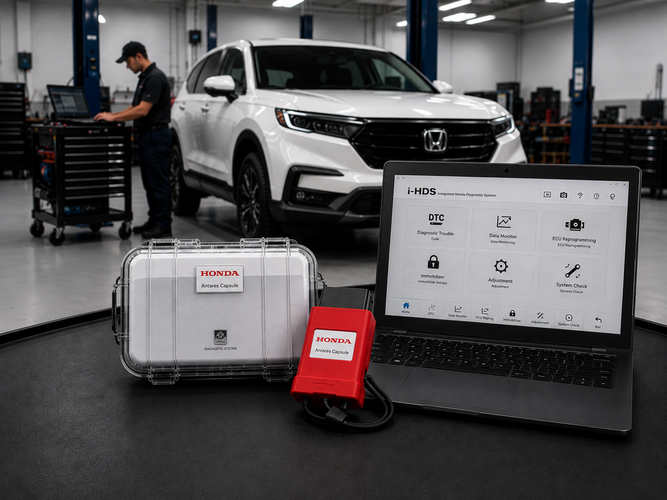
A modern Honda or Acura with a persistent electrical fault, a stubborn check engine light, or an immobilizer issue can push even a capable independent shop toward subletting the job. Honda/Acura HDS (Honda Diagnostic System) and i-HDS (Integrated Honda Diagnostic System) give your shop dealership-level access for ECU reprogramming, ADAS calibration, and immobilizer work, without sending the customer elsewhere. Here’s what that looks like in practice.
Why i-HDS Belongs in Your Bay
Diagnostic and reprogramming depth
Generic OBD2 scanners typically miss brand-specific data parameters. The i-HDS suite reads and clears all DTCs, streams live data, captures freeze-frame snapshots, and handles factory-level ECU reprogramming, so firmware updates and known bug fixes can be completed on your own shop floor.
ADAS calibration
Lane Keeping Assist, Collision Mitigation Braking, and similar systems need precise camera and sensor calibration after a collision repair or even a windshield replacement. Running those procedures through the OEM software suite keeps the calibration aligned with Honda’s own diagnostic workflow rather than a third-party interpretation of it.
Immobilizer and key work
Lost keys, failed ignition switches, and swapped ECUs are usually the jobs that get towed to a dealer. Access to the immobilizer system requires a Security Professional-level i-HDS subscription plus Vehicle Security Professional (VSP) registration through NASTF; with that credential in place, your techs get the factory Immobilizer Setup Tool and can program keys and initialize immobilizers in-house. (source: Honda TechInfo)
Troubleshooting resources
Pairing i-HDS with a Service Information System (SIS) subscription opens up Honda’s browser-based repair information, giving techs step-by-step diagnostic guidance instead of starting from scratch.
Subscription flexibility
You don’t need a shop full of Hondas to justify the software. Honda TechInfo offers short-term as well as annual subscription options, so a shop that only sees the occasional Honda or Acura can scale the cost to actual volume. Pair a subscription with a J2534-compliant VCI and an existing shop laptop becomes a Honda/Acura diagnostic station.
Per Honda’s equipment program listing for the Honda Antares Capsule.
The Honda Antares Capsule (HAC)
The Honda Antares Capsule (HAC) is Honda and Acura’s current recommended Smart VCI, replacing the legacy Denso DST-i. American Honda and Honda Canada worked directly with the manufacturer of the HAC to validate it against the i-HDS suite for both diagnostics and reprogramming. (source: Honda TechInfo)
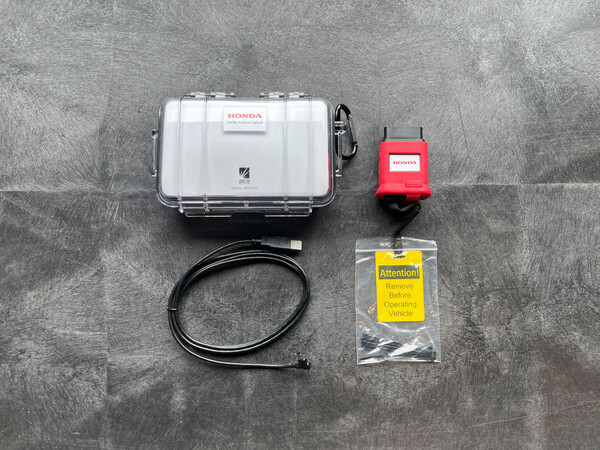
The HAC supports the full HDS and i-HDS feature set, connects over Wi-Fi for routine diagnostics, and requires a wired USB connection for ECU flashing and control module updates. It’s built into a shock-resistant rubber boot with a cable retention strap and ships in a waterproof case, with a boot-up time Honda’s equipment program lists at around five seconds. (source: Honda Tool and Equipment Program)
Connecting the HAC can also trigger an automatic DTC scan and sync VIN and fault data to the Honda Diagnostic Cloud, giving your shop a running diagnostic history tied to each vehicle.
Do You Need the HAC Specifically?
Not strictly. i-HDS supports any generic SAE J2534-1/2 pass-thru device, including tools like the Opus IVS Mongoose-Plus. But Honda does not provide technical or customer support for generic VCIs, so any support issues fall on whichever device supplier you choose. The HAC is the only device Honda co-developed specifically for safe interaction during sensitive operations like reprogramming. (source: Honda TechInfo)
PC Specifications
Confirmed against Honda TechInfo’s current system requirements page:
| Operating System | Microsoft Windows 11 Professional (64-bit) or Enterprise (64-bit). |
| Processor | 13th Generation Intel Core i7 with 10 cores or more. Processors from other brands (AMD, Qualcomm ARM) are not officially certified, and emulation environments may fail during programming. |
| Memory (RAM) | 32 GB. |
| Storage | SSD with a minimum of 300 GB free space. |
| Video Resolution | 1920 x 1080 or higher. |
| Network | 1 Gigabit Ethernet (wired) and 802.11ac (Wi-Fi 5) or greater wireless. |
| USB | USB 3.1 with a physical Type-A connector. |
| Bluetooth | 4.2 or higher. |
Source: Honda TechInfo.
Configuring Your Shop’s Network for the HAC
Because the HAC talks to your diagnostic laptop locally and to Honda’s servers remotely, the wireless connection between the two needs to be set up correctly.
Disable AP/client isolation on your shop router so the laptop and HAC can see each other, and keep both devices on the same SSID and band. If you run into connectivity issues with the HDC after that, Honda TechInfo support can walk you through any additional firewall configuration your specific security setup needs.
Installing the HAC Drivers
Install the i-HDS software before plugging in the capsule for the first time.
- 1
Log into the Honda TechInfo Service Portal and download the i-HDS software package, which bundles the HAC driver and Device Manager. Run the installer as administrator and restart once it finishes.
- 2
Connect the HAC to a USB 3.1 Type-A port directly on the laptop, not through a hub or extension cable, which can cause data corruption during J2534 operations. Windows will detect and install the device; this typically takes 10–15 seconds.
- 3
Open the HAC Device Manager, select your unit, and log in with your Honda TechInfo credentials to register the capsule to your shop’s license.
- 4
Finally, check for firmware updates under the capsule’s settings and let any update finish completely before unplugging.
Let ADAS Depot Handle the Setup
If assembling a compliant diagnostic laptop from scratch isn’t how you want to spend a Tuesday, ADAS Depot can build one for you, single-brand or multi-brand and partitioned for what your shop actually works on.
