
There is a Tech 2 in a drawer in half the independent shops in America. It still boots, the card still reads, and for a 2005 Silverado it will do things a $3,000 aftermarket tablet cannot. Then a 2021 Tahoe rolls in, the tool cannot see half the modules, and the shop starts wondering whether the problem is the vehicle, the cable, or the twenty-year-old scanner.
It is the scanner. GM changed its vehicle architecture twice since the Tech 2 was designed, and each change moved the line further away from what that tool can reach.
What the Tech 2 Still Does Well
The GM Tech 2 scan tool was GM's dealer tool from the early 1990s into the early 2010s, and on the vehicles it was made for it is still one of the better ways to work. Bidirectional control is thorough, the menus follow GM's own service information, and the tool talks to body and chassis modules that generic OBD-II equipment never sees.
On a GM vehicle from roughly 1992 through the end of the pre-Global A era, a working Tech 2 with a current software card handles diagnosis, bidirectional tests, and most relearn procedures without help. That range includes OBD-I vehicles, which is part of why the tool still has a place.
On CAN-based vehicles, you also need the CANdi module inline, since the Tech 2 has no CAN transceiver of its own. Without it the tool cannot reach the CAN modules, though it will still talk to the Class 2 modules on the same vehicle. That half-working behavior on mixed-bus vehicles from roughly 2004 to 2007 is the single most common reason a shop thinks its Tech 2 has died.
Shops that hold onto one usually work a lot of older trucks, and that is a defensible reason to keep it on the shelf.
Where the Coverage Stops
GM moved to an architecture it calls Global A starting around the 2010 model year, phased in by platform rather than all at once. Global A vehicles use a different network layout and a different diagnostic protocol, and the Tech 2 was never updated to reach them. GM's replacement software for those vehicles is GDS2, running on a Windows laptop through an MDI or MDI 2 interface.
Then GM moved again. Global B arrived on 2020 model year vehicles, starting with the Cadillac CT4, CT5, XT4, and the C8 Corvette, and spread across the lineup from there. It brought Serial Data Authentication, over-the-air update capability, and module programming that has to be authenticated. Global B needs an MDI 2 specifically. The original MDI cannot complete these procedures, and neither can any generation of Tech 2.
So the practical answer to "what year does my Tech 2 stop working" is that there are two lines, not one, and both fall in the middle of vehicles you are seeing every week.
Tech2Win Keeps the Interface, Drops the Hardware
Shops that like how the Tech 2 works do not have to give up the interface. Tech2Win is GM's software emulation of the Tech 2, and it runs on a Windows laptop through an MDI, a GM MDI 2, or another compliant J2534 pass-thru device. Same menu structure, same navigation, no aging handheld and no software cards to source.
That matters more than it sounds. A tech who learned GM diagnosis on a Tech 2 can move to a laptop without relearning where anything lives, and the same laptop then opens GDS2 for the newer vehicles the handheld cannot touch. One box, both eras.
It is not free, though. Tech2Win comes off a GM or ACDelco TDS subscription and activates in blocks of thirty uses, with each launch of the application spending one. Budget for it the way you would any other software line item rather than treating it as a one-time purchase.
Genuine, Refurbished, or Clone
Search for a GM Tech 2 scan tool and most of what comes back is a clone. GM no longer sells the original new through its dealer equipment channel, so genuine units trade used or refurbished, and the price gap between a refurbished genuine tool and a copy is wide enough to tempt anyone.
What you give up with a clone:
- No path to legitimate software updates, so the card you get is the card you keep
- Build quality that varies from acceptable to unusable, with the CANdi module and the cables usually the first parts to fail
- No support when something stops working, and no warranty behind it
- Licensing that sits in a gray area, which matters if you are a shop rather than a hobbyist
For a shop that works GM vehicles for money, buying a copy of a tool GM no longer sells new, to cover half your fleet, is a hard case to make. The same money moves you onto hardware that covers the whole fleet.
What a GM Bay Uses Now
Two pieces, and they work together:
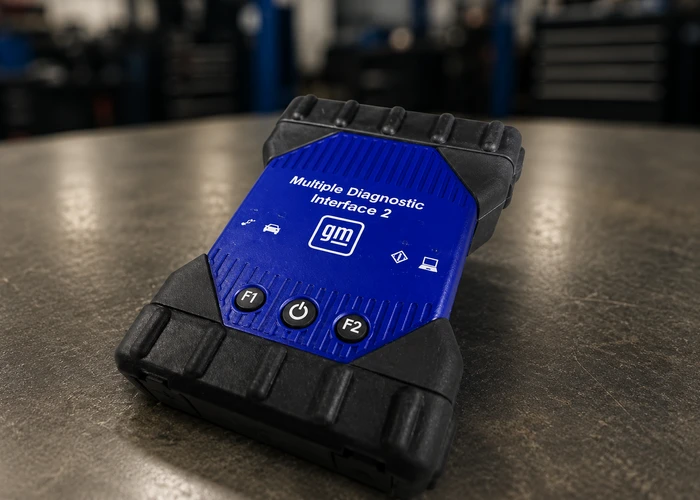
GM MDI 2, $1,499. GM's current interface. It supports GDS2, Tech2Win, and the Data Bus Diagnostic Tool, and it does pass-thru programming through TIS2Web and SPS. GM lists it as covering Global A and Global B vehicles, with backward pass-thru programming support on vehicles going back to 1996. It connects over USB and Ethernet, both cables in the box, with a wireless adapter as the optional add-on. Use the wired connection for programming.
GM GDS2 1 Year Subscription, Installed, $844. The diagnostic software itself, covering Chevrolet, GMC, Cadillac, Buick, Opel, and Vauxhall on Global A and newer architectures. You get code reading and clearing, freeze frame, bidirectional component tests including ABS bleeding, and module resets and calibrations. Our team installs it on your laptop remotely rather than leaving you to fight the setup.
You supply a Windows 10 or 11 64-bit laptop with an i5 or better and at least 8GB of RAM. If building that laptop is not how you want to spend an afternoon, we assemble diagnostic PCs configured for one brand or several.
Programming GM Modules
Diagnosis and programming are separate purchases at GM, and shops get caught by this.
GDS2 diagnoses. Module programming goes through SPS2, delivered inside Techline Connect, which replaced the older TIS2Web portal. It is a separate GM subscription bought as a multi-day pass, a month, or a year through acdelcotds.com. Your MDI 2 is the interface for both, so the hardware carries over, but a GDS2 subscription alone will not flash a module.
The rest of the flashing checklist is the same as it is on any make. Voltage has to hold steady for the length of the write, and a stable programming supply at $389 costs less than one bricked module. If you want the broader picture on pass-thru hardware, J2534 pass-thru programming tools covers the standard itself, and why OEM scan tools are the standard walks through the subscription math against aftermarket coverage.
Where ADAS Comes In
The Tech 2 predates driver assistance entirely, so any GM vehicle with lane keeping, forward collision alert, or adaptive cruise sits on the far side of the coverage line by definition. Those calibrations happen through GDS2 with the MDI 2, and on Global B vehicles the authenticated access is not optional.
One sequencing detail catches shops out: replacing a frontview windshield camera or a surround vision camera needs SPS2 programming before the calibration, and on some vehicles the calibration starts on its own once programming finishes rather than waiting for you to launch it from GDS2.
If your shop already turns away GM calibration work, that is usually the interface talking, not the technician.
GM Tech 2 and Modern GM Diagnostics FAQ
What model years does a GM Tech 2 scan tool cover?
Roughly 1992 through the pre-Global A vehicles, with the exact cutoff varying by platform since GM phased Global A in over several model years starting around 2010. CAN vehicles also need the CANdi module inline. Tech2Win, the laptop version, is documented from 1996 forward.
Can a Tech 2 program modules?
On older vehicles it can serve as the pass-thru device for SPS programming through GM's portal. On Global B vehicles it cannot, and an MDI 2 takes over.
Is Tech2Win the same as a Tech 2?
Functionally, for the vehicles both cover. Tech2Win emulates the Tech 2 interface on a Windows laptop and connects through an MDI, an MDI 2, or another compliant pass-thru device, so it reaches the same older vehicles without the handheld. It bills through a GM subscription rather than software cards.
Do I need both GDS2 and SPS2?
If you diagnose only, GDS2 is enough. If you program modules, you need an SPS2 subscription as well. Both work through the same interface, and an MDI 2 covers everything including Global B. GDS2 on its own will also work through an original MDI or a compliant J2534 device.
Will an aftermarket tablet replace all of this?
For diagnosis on many GM vehicles, a good aftermarket tablet gets close. For Global B programming, security access, and some calibrations, the OEM path is still the one that finishes the job.
Should I keep my old Tech 2?
If you work a meaningful number of pre-2010 GM vehicles, yes. It costs nothing to keep and it is faster on those cars than anything else. It just cannot be the only GM tool in the shop anymore.
Sorting Out Your GM Setup
Our team can tell you whether an MDI 2 and GDS2 covers what comes through your door, or whether your mix of vehicles calls for something else, and we can have the software installed before the tool ships. Book a free consultation or call (925) 566-8545.
